a list of things in PyTorch that took me a while to learn when I first came across them.
Admittedly, a lot of these are beginner-level difficulty, but if you do fit under that scope, then I hope it may serve you some use.
Definitions
In-place
When something is changed in-place, that means you won’t create a new i.e. tensor for some operation, and instead apply it on the operand. Hence it will not create new memory.
>>> x
0.2362
[torch.FloatTensor of size 1]
>>> x + y # Addition of two tensors creates a new tensor.
0.9392
[torch.FloatTensor of size 1]
>>> x
0.2362 # The value of x is unchanged.
[torch.FloatTensor of size 1]
>>> x.add_(y) # An in-place addition modifies one of the tensors itself, here the value of x.
0.9392
[torch.FloatTensor of size 1]
>>> x
0.9392
[torch.FloatTensor of size 1]
resources
https://discuss.pytorch.org/t/what-is-in-place-operation/16244/3
Operations
torch.no_grad()
Makes Torch turn off its autograd engine. Hence, new tensors will not be added to the computational graph.
Useful for:
- Performing inference
- Not leaking test data into the model training
>>> x = torch.randn(3, requires_grad=True)
>>> print(x.requires_grad)
True
>>> print((x ** 2).requires_grad)
True
>>> with torch.no_grad():
... print((x ** 2).requires_grad)
False
resources
- intro to autograd
- https://datascience.stackexchange.com/a/71598
- https://stackoverflow.com/questions/72504734/what-is-the-purpose-of-with-torch-no-grad/72504818#72504818
Tensor.unsqueeze()
“Stretches” an existing tensor into a new dimension. This new dimension of size 1 is also called a singleton dimension.
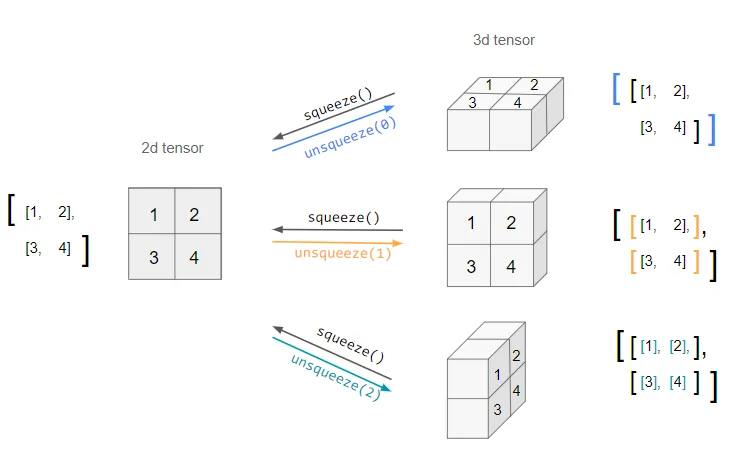
Basically, it’ll wrap the items at the specified dimension into a new array.
The opposite of this is Tensor.squeeze(), which then “removes” dimensions with length 1.
Tensor.max(dim)
Returns only the largest value. If dim is given, for dimension dim.
>>> t = tensor([[1, 3], [4,8]])
# return largest value
>>> t.max()
tensor(8)
# return largest value for each item on 1st dimension
>>> t.max(0)
torch.return_types.max(
values=tensor([4, 8]),
indices=tensor([1, 1]))
# return largest value for each item on 2nd dimension
>>> t.max(1)
torch.return_types.max(
values=tensor([3, 8]),
indices=tensor([1, 1]))
An intuition for this is that it’ll squish dim into a value of 1.
Tensor.unfold(dim, size, step)
For dimension dim, get batches of size every n-th step. If size > step, it truncates the final output.
>>> x = torch.arange(1, 8) # returns tensor([1, 2, 3, 4, 5, 6, 7])
>>> x.unfold(0, 2, 1)
tensor([[ 1.,  2.],
        [ 2.,  3.],
        [ 3.,  4.],
        [ 4.,  5.],
        [ 5.,  6.],
        [ 6.,  7.]])
torch.cat(list)
- stack: Concatenates sequence of tensors along a new dimension.
- cat: Concatenates the given sequence of seq tensors in the given dimension.
So if A and B are of shape (3, 4):
torch.cat([A, B], dim=0)will be of shape(6, 4)torch.stack([A, B], dim=0)will be of shape(2, 3, 4)
>>> torch.cat([tensor([1, 2, 3]), tensor([4, 5, 6])])
tensor([1, 2, 3, 4, 5, 6])
torch.gather(src, dim, idx)
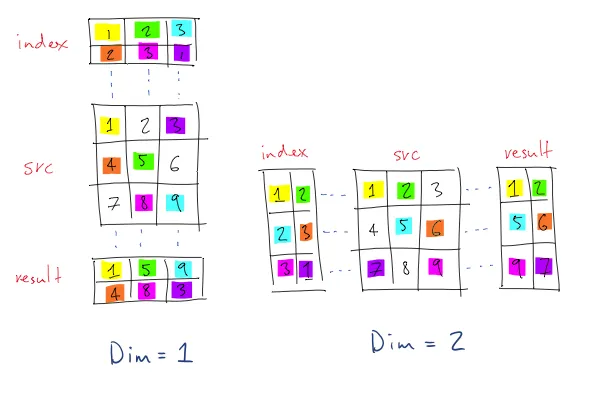
There are 2 requirements that might go unnoticed:
srcandidxhave to be of the same rank.- The size of both
srcandidxatdimmust match.
This means that, even if idx only has 1 row of index values, it need to have its own dimension (see the visualization).
>>> states=tensor([[1, 2, 3],[4, 5, 6]])
>>> actions=tensor([1, 2, 1])
>>> states.shape
torch.Size([2, 3])
>>> actions.shape
torch.Size([3])
# they are not of the same rank; we have to unsqueeze `actions` first
>>> actions=actions.unsqueeze(0)
torch.Size([1, 3])
>>> states.gather(1, actions.unsqueeze(0))
tensor([[2, 3, 2]])
torch.view(src, dim1, dim2, ...)
Turns src into a tensor of the specified dimensions. For -1, the size is left to be guessed.
>>> torch.zeros(3, 5, 6).shape
torch.Size([3, 5, 6])
>>> torch.zeros(3, 5, 6).view(-1).shape
torch.Size([90])
>>> torch.zeros(3, 5, 6).view(-1, 3).shape
torch.Size([30, 3])
>>> torch.zeros(3, 5, 6).view(-1, 3, 3).shape
torch.Size([10, 3, 3])
This is a way to visualize; it’ll basically take each value of the src tensor and start iterating through the indices, starting on the position lowest (0) and furthest in (last dimension). In our example, [0][0][0], then [0][0][1], and so on.
torch.nn.Softmax(dim)
Apply a softmax function along the nth dimension. It’s useful because it can map a range to probabilities. I was mostly wondering why it’s called “softmax”. Apparently, it’s an opposition to “hardmax”, which sets the maximum value to 1 and everything else to 0. Softmax, however, is non-lossy and maps values to a range.
resources
Tips
Working with batches
Remember that torch.nn.Modular will output a tensor of the same dimensions as its input.
>>> dqn(tensor([.5]))
tensor([-0.1096,  0.1605, -0.1288, -0.1131], grad_fn=<AddBackward0>)
>>> dqn(tensor([[.5]]))
tensor([[-0.1096,  0.1605, -0.1288, -0.1131]], grad_fn=<AddmmBackward0>)
>>> dqn(tensor([[[.5]]]))
tensor([[[-0.1096,  0.1605, -0.1288, -0.1131]]], grad_fn=<ViewBackward0>)
Dimensions intuition
One easy way to visualize dimensions or to know what dimension some data is in, is by noticing that their index corresponds to their “depth” on the bracket notation.
#             2nd dimension (size 2)
#             v
tensor([[[.1, .2, 3.], [.3, .4, 5.]]])
#            ^                          ^
#            1st dimension (size 1)     3nd dimension (size 3)
(of course, in actual code, the dimension indexes would start at 0.)
Also, the indices for tensor.Size correctly correspond to their dimension.
>>> tensor([[[.1, .2, 3.], [.3, .4, 5.]]]).shape
torch.Size([1, 2, 3])
Masking
If you have two tensors (or a tensor and an array) A and mask of same shape, where mask has a Boolean data type, you can use the notation A[mask] to “zip” over A.
NOTE
PyTorch will skip the entire operation for values ofmaskwhich areFalse. So for example, if you are assigning some tensorBtoA, be aware that the length ofBshould be the same of the n. ofTrues onmask(because forFalsevalues, the pointer won’t be incremented).
>>> a = tensor([5, 6, 7, 8])
>>> b = tensor([1, 2, 4])
>>> mask = tensor([ True,  True, False,  True])
>>> a[mask] = b
>>> a
tensor([1, 2, 7, 4])
Reshaping tensors
By using tensor.view(-1), you basically “reset” or flatten the tensor’s shape. You can then convert it into any other shape.
>>> x = tensor([[[1, 2, 3], [4, 5, 6]]])
>>> x.view(-1)
tensor([1, 2, 3, 4, 5, 6])
>>> x.view(-1, 2, 3)
tensor([[[1, 2, 3],
         [4, 5, 6]]])
Operation between tensors w/ differing shapes
One little quirk is that PyTorch will expect tensors of same shape, but is okay with singleton dimensions. Hence it is the case that:
# doesn't work
>>> tensor([1, 2, 3]) * tensor([[4, 5], [4, 2], [3, 4]])
''' Traceback (most recent call last):
  File "<stdin>", line 1, in <module>
RuntimeError: The size of tensor a (3) must match the size of tensor b (2) at non-singleton dimension 1'''
# tensor([[1], [2], [3]]) works!
>>> tensor([1, 2, 3]).unsqueeze(-1) * tensor([[4, 5], [4, 2], [3, 4]])
tensor([[ 4,  5],
        [ 8,  4],
        [ 9, 12]])
Variable-size tensors
Say you have multiple input tensors of variable size, and you want to lay them all in the same vector, e.g. a batch. Here’s what you can do:
>>> x = [tensor([1, 2, 3]), tensor([3, 4])]
>>> padded_x = torch.nn.utils.rnn.pad_sequence(a, batch_first=True) # similar to torch.stack, but allows padding